
You’ve picked your CPU. You’ve locked in your GPU. Now comes the question almost every builder ends up searching late at night:
“How many watts do I actually need?”
Choosing the wrong PSU can lead to crashes, wasted money, or even hardware risk. But getting it right is simpler than most guides make it.
In this guide, you’ll get exact PSU wattage recommendations for every type of gaming PC—from mid-range builds to high-end RTX 4090 setups. You’ll also learn how to choose the right power supply based on real-world power draw, efficiency, and upgrade headroom.
No fluff. Just clear numbers, smart decisions, and the confidence to pick the right PSU the first time.
PSU Wattage by GPU — Quick Reference Table
This is the most important table on this page. Find your GPU, read across.
| GPU | Idle Draw | Full Load Draw | Minimum PSU | Recommended PSU |
|---|---|---|---|---|
| RTX 4060 | 10W | 115W | 550W | 650W Gold |
| RTX 4060 Ti | 10W | 165W | 600W | 650W Gold |
| RTX 4070 | 15W | 200W | 650W | 750W Gold |
| RTX 4070 Super | 15W | 220W | 650W | 750W Gold |
| RTX 4070 Ti | 20W | 285W | 750W | 850W Gold |
| RTX 4070 Ti Super | 20W | 285W | 750W | 850W Gold |
| RTX 4080 | 20W | 320W | 800W | 850–1000W Gold |
| RTX 4080 Super | 20W | 320W | 850W | 1000W Gold |
| RTX 4090 | 25W | 450W | 1000W | 1200W Platinum |
| RX 7700 XT | 10W | 190W | 600W | 650W Gold |
| RX 7800 XT | 10W | 263W | 700W | 750W Gold |
| RX 7900 GRE | 15W | 260W | 700W | 750W Gold |
| RX 7900 XT | 20W | 315W | 800W | 850W Gold |
| RX 7900 XTX | 20W | 355W | 850W | 1000W Gold |
These numbers assume a high-end CPU (Intel i7/i9 or AMD Ryzen 7/9) under full gaming load. Budget CPUs draw less — adjust down by 30–50W if you’re pairing with a mid-range processor.
Why GPU Power Draw Is Everything
Your GPU is responsible for 60–75% of total system power consumption in a gaming PC.
A CPU like the i9-14900K draws up to 253W under full load. An RTX 4090 draws up to 450W. Together that’s already 700W — before RAM, storage, fans, and the motherboard.
This is why you can’t just guess. One wrong PSU choice either leaves your system unstable or costs you $50–80 extra for capacity you’ll never use.
Full System Wattage by Build Type
Real-world power consumption for complete gaming builds — not just the GPU alone.
Budget Gaming Build
Example: Ryzen 5 7600 + RTX 4060
- CPU: ~65W
- GPU: ~115W
- Rest of system: ~50W
- Total: ~230W
- Recommended PSU: 550W Gold
Mid-Range Gaming Build
Example: Ryzen 7 7800X3D + RTX 4070
- CPU: ~88W
- GPU: ~200W
- Rest of system: ~60W
- Total: ~348W
- Recommended PSU: 650–750W Gold
High-End Gaming Build
Example: Intel i9-14900K + RTX 4080
- CPU: ~253W
- GPU: ~320W
- Rest of system: ~75W
- Total: ~648W
- Recommended PSU: 850–1000W Gold
Enthusiast Build
Example: Intel i9-14900K + RTX 4090
- CPU: ~253W
- GPU: ~450W
- Rest of system: ~80W
- Total: ~783W
- Recommended PSU: 1000–1200W Platinum
The 20–30% Headroom Rule
Never buy a PSU rated exactly at your calculated wattage.
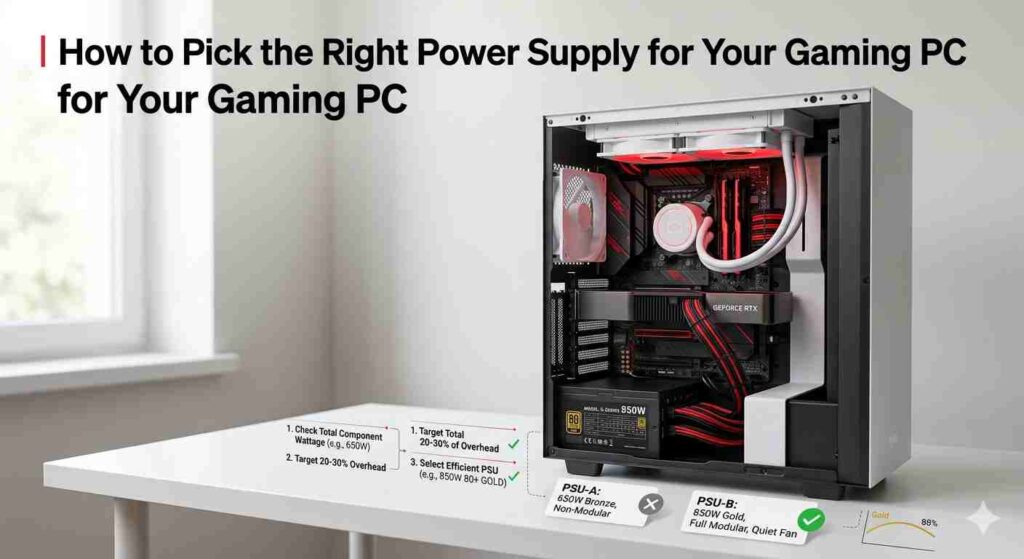
Why? PSUs run most efficiently — and coolest — at 50–80% of their rated capacity. Running a PSU at 90–100% load shortens its lifespan, generates more heat, and risks instability during power spikes.
The formula:
Calculated wattage × 1.25 = Minimum PSU wattage to buy
Example: Your system needs 500W → buy at least a 650W PSU.
It also gives you room if you upgrade your GPU next year without buying a new power supply.
How to Pick the Right Power Supply for Your Gaming PC
Getting the right PSU comes down to four decisions. Make them in this order.
Decision 1 — Get Your Wattage Right
Use a free PSU calculator (like the one at techsearchers.com/psu-calculator) to enter your exact CPU and GPU and get a precise wattage estimate. Then add 20–30% headroom.
Do not guess. A $10 visit to a PSU calculator saves you from a $200+ mistake.
Decision 2 — Choose the Right Efficiency Rating (80 PLUS)
The 80 PLUS certification measures how efficiently a PSU converts wall power into usable power for your PC.
| Rating | Efficiency (50% load) | Who It’s For |
|---|---|---|
| Bronze | 85% | Budget builds under $800 |
| Gold | 90% | Best value — most gaming builds |
| Platinum | 92% | High-wattage or 24/7 systems |
| Titanium | 94% | Extreme builds, workstations |
For 99% of gaming PCs: Gold is the answer. It balances efficiency, price, and reliability perfectly. Platinum only makes financial sense if you’re running a 1000W+ system many hours per day.
Decision 3 — Modular, Semi-Modular, or Non-Modular?
This affects cable management and build cleanliness — not performance.
Non-Modular: All cables are permanently attached. Cheapest option. Cable clutter inside your case hurts airflow.
Semi-Modular: Main cables (24-pin, CPU power) are fixed. Extra cables (GPU, SATA) detach. Good middle ground.
Fully Modular: Every cable detaches. Best airflow, cleanest build, easiest installation. Worth the extra $15–25 for mid-range and above builds.
Recommendation: Semi-modular for budget builds. Fully modular for anything $100+ on the PSU.
Decision 4 — Pick a Trusted Brand
A bad PSU can kill your entire build. Unstable voltage damages CPU, GPU, and storage over time. Cheap, unbranded units are the single most common cause of unexplained PC instability.
Brands you can trust:
- Seasonic — Best in class. OEMs of many other brands’ units.
- Corsair (RM and HX series) — Reliable, widely available, great warranties.
- Be quiet! — Excellent build quality, very quiet operation.
- Fractal Design (Ion series) — Underrated, outstanding value.
- EVGA — No longer making PSUs but existing stock is excellent.
- Asus ROG / TUF — Premium option for high-end builds.
Avoid: No-name units from unknown brands, even if they show 80 PLUS certification. Certification alone doesn’t guarantee build quality or voltage stability.
RTX 4090 Power Supply — Special Considerations
The RTX 4090 is in its own category. It pulls up to 450W alone — more than most entire gaming systems.
Key points for RTX 4090 builds:
Use at least 1000W, ideally 1200W. The card can spike to 600W+ for milliseconds during transient loads. A 1000W PSU running a 4090 at full load is already at 70–80% capacity.
Check your PSU connector. The RTX 4090 uses the 16-pin 12VHPWR connector (also called 12V-2×6). If your PSU doesn’t have it natively, use the official adapter — but check it regularly. Melted adapters were a real issue in early 4090 launches.
ATX 3.0 PSU is recommended. ATX 3.0 standard PSUs are designed to handle the extreme transient power spikes of modern GPUs. Look for “ATX 3.0” or “PCIe 5.0 ready” labels when buying for a 4090 build.
Best PSUs for RTX 4090 builds:
- Seasonic Prime TX-1300 (1300W Titanium)
- Corsair HX1500i (1500W Platinum)
- be quiet! Dark Power 13 1000W (Titanium)
- ASUS ROG Thor 1200P2 (1200W Platinum, ATX 3.0)
RTX 4070 Power Supply — Best Value Zone
The RTX 4070 sits in the sweet spot — high performance without extreme power demands.
At 200W TDP, it pairs well with mid-to-high-end CPUs, and a 750W Gold PSU comfortably covers virtually any build.
Best PSUs for RTX 4070 builds:
- Corsair RM750x (750W Gold, fully modular)
- Seasonic Focus GX-750 (750W Gold)
- be quiet! Straight Power 11 750W (Gold)
Even if you upgrade to an RTX 4070 Ti later, a quality 850W Gold PSU covers you without needing a replacement.
Signs Your PSU Is Underpowered
Already built your PC and wondering if your PSU is the problem? Watch for these:
- Random shutdowns under gaming load, but stable at idle
- Blue screens that only happen during demanding games
- GPU clock speeds dropping mid-game (power throttling)
- The system won’t POST after adding a new GPU
- Coil whine is getting louder under heavy load
Any of these under gaming load = your PSU is likely struggling. Run a PSU calculator to check if your unit is undersized.
How to Calculate Your PSU Wattage (Free Tool)
Don’t want to manually add up component TDPs? You don’t have to.
Use the free PSU calculator:
- Select your CPU
- Select your GPU
- Add RAM, storage, and fans
- Click Calculate
- Get your exact recommended wattage in seconds
The calculator covers all current-gen components, including RTX 40-series and RX 7000-series GPUs, with accurate real-world power draw data — not just TDP spec sheet numbers.
Frequently Asked Questions
1. Is a 650W PSU enough for RTX 4070 gaming PCs?
Yes, a 650W PSU is sufficient for most RTX 4070 builds. A typical system with a mid-range CPU (Ryzen 7 or Intel i5/i7) consumes around 380–420W under load, leaving safe headroom. For better efficiency and longevity, a 650W 80 PLUS Gold power supply is recommended.
2. How much PSU wattage is required for RTX 4090?
An RTX 4090 system requires at least a 1000W PSU, while 1200W is recommended for stability and future upgrades. The GPU alone can draw up to 450W, and total system power can exceed 700W during peak loads.
3. Does a higher wattage PSU increase electricity usage?
No, PSU wattage does not determine power consumption. A power supply only draws the wattage your PC needs. For example, a 1000W PSU running a 400W system will only consume about 400W (plus minor efficiency loss).
4. What happens if a PSU runs at full capacity?
Running a PSU at 100% load can cause overheating, increased fan noise, reduced efficiency, and shorter lifespan. For optimal performance, maintain 20–30% headroom above your system’s peak power draw.
5. Is 80 PLUS Gold better than Bronze for gaming PCs?
Yes, 80 PLUS Gold PSUs are more efficient than Bronze units. They produce less heat, run quieter, and offer better long-term reliability. The small extra cost makes Gold-rated power supplies ideal for gaming systems.
6. Can I reuse an old PSU for RTX 4090 builds?
You can reuse an old PSU only if it meets modern requirements: at least 1000W capacity, ATX 3.0 compatibility or a reliable 12VHPWR connector, and a trusted brand. Otherwise, upgrading is strongly recommended for system safety.
7. What is the difference between GPU TDP and real power draw?
TDP (Thermal Design Power) refers to heat output, not exact power usage. Real-world GPU power draw can match or slightly exceed TDP during gaming. For accurate PSU sizing, always consider actual measured power consumption instead of just TDP.
