

MSI is one of the most trusted motherboard brands on the market. Whether you’re building a gaming rig, a home office PC, or a professional workstation, MSI boards deliver reliable power delivery, solid connectivity, and a user-friendly BIOS. This guide covers every major MSI motherboard worth buying right now, including the newest 2025 AMD B850 and Intel Z890 releases.
We split the lineup into two clear categories: AMD (AM5 socket) and Intel (LGA 1700 / LGA 1851). Use the quick-pick summary below or jump straight to the board you need.
Quick-Pick Summary
Not sure where to start? Match your goal to the right board:
| Goal | Recommended Board | Platform |
| Best overall AMD gaming | MAG B850 Tomahawk MAX WiFi | AMD AM5 (Ryzen 9000/8000/7000) |
| Best value AMD gaming | MAG B850 Tomahawk WiFi | AMD AM5 (Ryzen 9000/8000/7000) |
| Best Intel productivity | PRO Z890–P WiFi | Intel LGA 1851 (Core Ultra 200) |
| Best Intel with clean design | PRO Z890-S WiFi | Intel LGA 1851 (Core Ultra 200) |
| Best AMD high-end gaming | MAG X670E Tomahawk WiFi | AMD AM5 (Ryzen 8000/7000) |
| Best Intel mid-range upgrade | MAG Z790 Tomahawk WiFi | Intel LGA 1700 (13th/14th Gen) |
| Best budget AMD AM5 | PRO A620M-E ProSeries | AMD AM5 (Ryzen 8000/7000) |
| Best mini-ITX AMD | MPG B650I Edge | AMD AM5 (Ryzen 8000/7000) |
| Best budget Intel | PRO B760-P WiFi DDR4 | Intel LGA 1700 (12th/13th/14th Gen) |
| Best legacy AMD AM4 | MAG B550 TOMAHAWK | AMD AM4 (Ryzen 5000 and older) |
AMD Motherboards (AM5)
All AMD boards below use the AM5 socket and support DDR5 memory. They are forward-compatible with AMD Ryzen 7000, 8000, and 9000 series processors.
1. MSI MAG B850 Tomahawk MAX WiFi — Best Overall AMD Gaming Board (NEW 2025)
Platform: AMD AM5 · Chipset: B850 · Form Factor: ATX · Socket: AM5
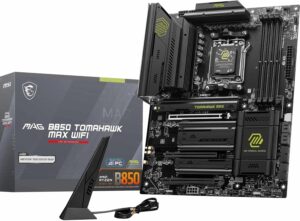
The MAG B850 Tomahawk MAX WiFi is MSI’s flagship B850 board in the MAG tier and the best all-around pick for anyone building an AMD gaming PC in 2025. It combines next-generation connectivity — including Wi-Fi 7, PCIe 5.0 x16, and M.2 Gen5 storage — with a robust 14+2+1 VRM rated at 80A per phase, meaning it can comfortably handle even the most demanding Ryzen 9000 processors without breaking a sweat.
What makes this board stand out at its ~$229 price point is the combination of dual PCIe 5.0 M.2 slots (for cutting-edge NVMe SSDs), a 5G LAN port, and three USB-C rear ports. The server-grade PCB with 2oz thickened copper adds long-term durability rarely seen at this price.
| CPU Support | AMD Ryzen 9000 / 8000 / 7000 (AM5) |
| Chipset | AMD B850 |
| Memory | DDR5 up to 8400+ MT/s (OC), 4 DIMM slots, max 256 GB |
| VRM | 14+2+1 Duet Rail, 80A SPS per phase |
| Storage | 4x M.2 (2x PCIe 5.0 x4, 2x PCIe 4.0 x4) + 4x SATA |
| GPU Slot | PCIe 5.0 x16 |
| Networking | Wi-Fi 7 (802.11be), Bluetooth 5.4, Realtek 5G LAN |
| Rear USB | 3x USB-C (10 Gbps), 2x USB-A 10 Gbps, 4x USB-A 2.0 |
| Audio | Realtek ALC4080 7.1 HD Audio |
| Form Factor | ATX |
| ✅ Reasons to Buy | ❌ Reasons to Avoid |
| • Excellent 14+2+1 80A VRM for high-end CPUs | • No USB4/Thunderbolt 4 |
| • Dual PCIe 5.0 M.2 slots | • Slight yellow accent color (updated in MAX II refresh) |
| • Wi-Fi 7 + 5G LAN | |
| • Three USB-C rear ports | |
| • EZ DIY tools (toolless M.2, easy GPU release) |
2. MSI MAG B850 Tomahawk WiFi — Best Value AMD Gaming Board (NEW 2025)
Platform: AMD AM5 · Chipset: B850 · Form Factor: ATX · Socket: AM5
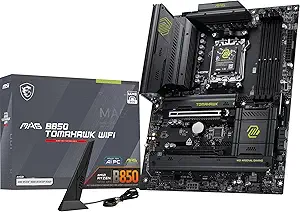
The MAG B850 Tomahawk WiFi is the non-MAX sibling — same great platform, slightly trimmed spec list, and a lower price. It’s still built on the B850 chipset with full support for Ryzen 9000/8000/7000 CPUs, DDR5, PCIe 5.0 graphics, and M.2 Gen5 storage. If you don’t need the absolute maximum VRM headroom or dual PCIe 5.0 M.2 slots, this board saves you money without meaningful gaming compromises.
It ships with Wi-Fi 7, 5G LAN, PCIe 5.0 x16 for the GPU, and MSI’s signature EZ DIY features. An ideal pick for mid-range Ryzen 9000 builds where value matters.
| CPU Support | AMD Ryzen 9000 / 8000 / 7000 (AM5) |
| Chipset | AMD B850 |
| Memory | DDR5 up to 8200+ MT/s (OC), 4 DIMM slots |
| VRM | 14+2+1 Duet Rail, 80A SPS |
| Storage | M.2 Gen5 + M.2 Gen4 slots + SATA |
| GPU Slot | PCIe 5.0 x16 |
| Networking | Wi-Fi 7, Bluetooth 5.4, 5G LAN |
| Form Factor | ATX |
| ✅ Reasons to Buy | ❌ Reasons to Avoid |
| • Great price-to-performance | • Fewer PCIe 5.0 M.2 slots than the MAX |
| • PCIe 5.0 GPU and M.2 Gen5 support | • Less rear I/O than the MAX version |
| • Wi-Fi 7 + 5G LAN | |
| • Solid VRM for mainstream Ryzen 9000 |
3. MSI MAG X670E Tomahawk WiFi Gaming — Best Premium AMD Upgrade
Platform: AMD AM5 · Chipset: X670E · Form Factor: ATX · Socket: AM5
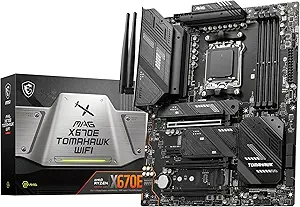
Still one of the most capable AMD motherboards available, the MAG X670E Tomahawk WiFi uses the enthusiast X670E chipset — which mandates PCIe 5.0 for both the GPU slot and at least one M.2. It’s the board to pick if you want the highest-tier AM5 chipset without spending on a full MPG or MEG board.
Its 14+2+1 VRM, four M.2 slots (one PCIe 5.0), Wi-Fi 6E, and outstanding rear I/O make it a long-term platform investment. Any Ryzen 7000, 8000, or 9000 CPU will run at full potential here.
| CPU Support | AMD Ryzen 9000 / 8000 / 7000 (AM5) |
| Chipset | AMD X670E |
| Memory | DDR5 up to 7800 MT/s (OC), max 64 GB |
| VRM | 14+2+1 stage |
| Storage | 4x M.2 (1x PCIe 5.0, 3x PCIe 4.0) + SATA |
| GPU Slot | PCIe 5.0 x16 (X670E mandated) |
| Networking | Wi-Fi 6E, Bluetooth 5.3 |
| Form Factor | ATX |
| ✅ Reasons to Buy | ❌ Reasons to Avoid |
| • X670E mandates PCIe 5.0 GPU + M.2 | • Pricier than B650/B850 options |
| • Excellent rear I/O | • Wi-Fi 6E (not 7) — newer boards have Wi-Fi 7 |
| • Strong 14+2+1 VRM | |
| • Proven stability with Ryzen 7000/8000 |
4. MSI MAG B650 Tomahawk WiFi Gaming — Best Midrange AMD Value
Platform: AMD AM5 · Chipset: B650 · Form Factor: ATX · Socket: AM5
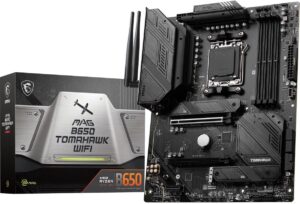
A proven AM5 board that still delivers excellent value for Ryzen 7000 and 8000 series builds. The B650 chipset supports PCIe 5.0 on at least one M.2 slot (PCIe 5.0 NVMe SSD ready), three M.2 slots total, and a generous 14+2+1 VRM that’s overkill for mainstream CPUs — meaning tons of thermal headroom.
If you’re building a Ryzen 7 or Ryzen 9 system and want to save versus X670E, this board is the smart pick. Just note: newer builds should consider B850 boards instead for Wi-Fi 7 and better memory speeds.
| CPU Support | AMD Ryzen 8000 / 7000 (AM5) |
| Chipset | AMD B650 |
| Memory | DDR5 up to 7600 MT/s (OC), max 128 GB |
| VRM | 14+2+1 stage |
| Storage | 3x M.2 (PCIe 4.0) + SATA |
| GPU Slot | PCIe 4.0 x16 |
| Networking | Wi-Fi 6E |
| Form Factor | ATX |
| ✅ Reasons to Buy | ❌ Reasons to Avoid |
| • Beefy VRM at a fair price | • Overkill VRM for budget Ryzen CPUs |
| • Three M.2 slots with PCIe 4.0 | • No Wi-Fi 7 (6E only) |
| • 128 GB max RAM | • B850 boards are better for new builds |
5. MSI MPG B650I Edge — Best Mini-ITX AMD Board
Platform: AMD AM5 · Chipset: B650 · Form Factor: Mini-ITX · Socket: AM5
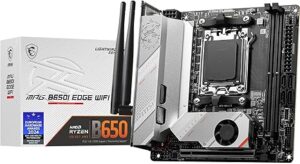
Small form factor builds have a strong option in the MPG B650I Edge. It packs an AM5 B650 chipset into a Mini-ITX board, supporting Ryzen 8000 and 7000 CPUs with DDR5 memory, built-in Wi-Fi, and a decent rear I/O. The 8+2+1 VRM is appropriate for non-X (non-overclocking-focused) CPUs like the Ryzen 7 7700 or Ryzen 9 7900.
Keep in mind Mini-ITX boards always have trade-offs — fewer M.2 slots and expansion options — but if you’re building a compact gaming PC, this is one of the best MSI options available.
| CPU Support | AMD Ryzen 8000 / 7000 (AM5) |
| Chipset | AMD B650 |
| Memory | DDR5 up to 7200 MT/s (OC), max 64 GB |
| VRM | 8+2+1 stage |
| Networking | Wi-Fi 6E, Bluetooth |
| Form Factor | Mini-ITX |
| ✅ Reasons to Buy | ❌ Reasons to Avoid |
| • Compact Mini-ITX form factor | • Active fan cooling on VRM heatsink |
| • Good rear I/O for the size | • Expensive relative to ATX B650 boards |
| • Solid price for B650 ITX | • Limited expansion slots |
6. MSI PRO A620M-E ProSeries — Cheapest AM5 Entry Point
Platform: AMD AM5 · Chipset: A620 · Form Factor: Micro-ATX · Socket: AM5
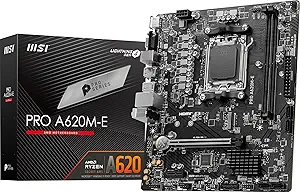
If you want to get onto the AM5 platform for as little as possible, the PRO A620M-E is your answer. It supports Ryzen 7000 and 8000 processors, includes DDR5 memory, one PCIe 4.0 M.2 slot, and a 9-stage VRM. It won’t overclock your CPU (A620 chipset doesn’t support that), but for everyday computing, streaming, and casual gaming, it’s completely capable.
A good pairing: Ryzen 5 7600 or Ryzen 7 8700G (the integrated-graphics model) for a budget-friendly system with no GPU required.
| CPU Support | AMD Ryzen 8000 / 7000 (AM5) |
| Chipset | AMD A620 |
| Memory | DDR5 up to 6800 MT/s, max 64 GB |
| VRM | 9-stage |
| Storage | 1x M.2 PCIe 4.0 + SATA |
| Form Factor | Micro-ATX |
| ✅ Reasons to Buy | ❌ Reasons to Avoid |
| • One of the cheapest AM5 motherboards available | • No CPU overclocking support |
| • PCIe 4.0 M.2 slot included | • Barebones feature set |
| • Clean and simple setup | • No budget Ryzen CPUs (Ryzen 5000) supported on AM5 |
7. MSI MAG B550 TOMAHAWK — Best Legacy AM4 Board
Platform: AMD AM4 · Chipset: B550 · Form Factor: ATX · Socket: AM4
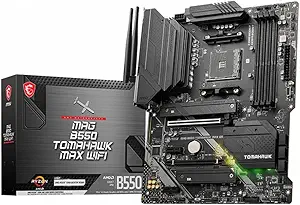
Not everyone is upgrading to AM5 yet, and the MAG B550 TOMAHAWK remains a strong pick for Ryzen 5000 series builds. It offers a 10+2+1 VRM, PCIe 4.0 for the GPU and primary M.2, solid audio, and broad AMD CPU support going back to Ryzen 3000. If you already own a Ryzen 5000 CPU or need a reliable AM4 board, this is the one to get.
| CPU Support | AMD Ryzen 5000 / 3000 (AM4) |
| Chipset | AMD B550 |
| Memory | DDR4 up to 5100 MT/s (OC), max 128 GB |
| VRM | 10+2+1 stage |
| Storage | PCIe 4.0 x4 M.2 + PCIe 3.0 M.2 + SATA |
| GPU Slot | PCIe 4.0 x16 |
| Form Factor | ATX |
| ✅ Reasons to Buy | ❌ Reasons to Avoid |
| • PCIe 4.0 GPU + M.2 support | • AM4 socket — no upgrade path to Ryzen 7000/9000 |
| • Superb value for AM4 builds | • Weak rear I/O compared to AM5 boards |
| • Proven long-term reliability | • DDR4 only |
Intel Motherboards (LGA 1700 & LGA 1851)
MSI now offers Intel boards across two platforms: the older LGA 1700 (12th/13th/14th Gen Core) and the current LGA 1851 (Intel Core Ultra 200 Series / Arrow Lake). The Z890 boards are the latest generation.
8. MSI PRO Z890-P WiFi — Best Intel Productivity Board (NEW 2025)
Platform: Intel LGA 1851 · Chipset: Z890 · Form Factor: ATX
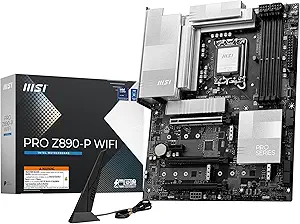
The PRO Z890-P WiFi is MSI’s go-to recommendation for Intel Core Ultra 200 Series (Arrow Lake) users who want professional-grade performance without an extreme price tag. It runs a 14+1+1 VRM with 55A DrMOS stages, supports DDR5 memory beyond 8600 MT/s overclocked, and includes four M.2 slots — one of which is M.2 Gen5 — alongside Thunderbolt 4, Wi-Fi 7, and a 5G LAN port.
The PRO series is designed with a clean silver aesthetic and targets content creators, developers, and power users as much as gamers. MSI’s AI Boost feature allows NPU overclocking on compatible processors, with up to a 27% AI performance improvement.
| CPU Support | Intel Core Ultra 200 Series (LGA 1851) |
| Chipset | Intel Z890 |
| Memory | DDR5 up to 8600+ MT/s (OC), 4 DIMM, max 256 GB |
| VRM | 14+1+1+1 Duet Rail, 55A DrMOS |
| Storage | 4x M.2 (1x Gen5, 3x Gen4) + 4x SATA |
| GPU Slot | PCIe 5.0 x16 |
| Networking | Wi-Fi 7, Bluetooth 5.4, Realtek 5G LAN |
| Special | Thunderbolt 4 (40 Gbps), USB-C rear I/O |
| Form Factor | ATX |
| ✅ Reasons to Buy | ❌ Reasons to Avoid |
| • Strong 14+1+1 VRM for Core Ultra CPUs | • Priced above B860 alternatives |
| • Thunderbolt 4 + Wi-Fi 7 + 5G LAN | • No USB4 40Gbps header |
| • M.2 Gen5 storage slot | |
| • Clean silver design — matches any build | |
| • MSI AI Boost NPU overclocking |
9. MSI PRO Z890-S WiFi — Best Intel Board with Elegant Design (NEW 2025)
Platform: Intel LGA 1851 · Chipset: Z890 · Form Factor: ATX
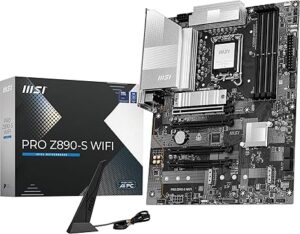
The PRO Z890-S WiFi is the more streamlined sibling to the Z890-P. It uses a 12+1+1 VRM with P-PAK power stages, which is still more than sufficient for mainstream Core Ultra 200 CPUs. The board stands out for its harmonious silver color scheme that pairs perfectly with white or monochrome PC builds.
It still features Thunderbolt 4, Wi-Fi 7, three M.2 slots (one Gen5), PCIe 5.0 x16 for the GPU, and MSI’s server-grade PCB with SMT solder welding for improved signal clarity. A great choice if clean aesthetics and Intel’s latest platform matter to you without overspending.
| CPU Support | Intel Core Ultra 200 Series (LGA 1851) |
| Chipset | Intel Z890 |
| Memory | DDR5 up to 8600+ MT/s (OC), max 256 GB |
| VRM | 12+1+1+1 Duet Rail, P-PAK |
| Storage | 3x M.2 (1x Gen5, 2x Gen4) + SATA |
| GPU Slot | PCIe 5.0 x16 |
| Networking | Wi-Fi 7, Bluetooth 5.4, Realtek 2.5G LAN |
| Special | Thunderbolt 4 (40 Gbps) |
| Form Factor | ATX |
| ✅ Reasons to Buy | ❌ Reasons to Avoid |
| • Clean silver design — great for white builds | • 2.5G LAN (Z890-P has 5G LAN) |
| • Thunderbolt 4 + Wi-Fi 7 | • Slightly less VRM headroom vs. Z890-P |
| • M.2 Gen5 included | • Three M.2 vs four on Z890-P |
| • Server-grade PCB quality |
10. MSI MPG Z790 Carbon WiFi — Best Intel 13th/14th Gen Gaming Board
Platform: Intel LGA 1700 · Chipset: Z790 · Form Factor: ATX
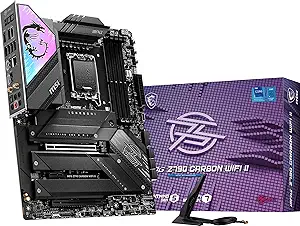
The MPG Z790 Carbon WiFi remains the top choice for 13th and 14th Generation Intel Core builds. Its 19+1+1 VRM is among the most powerful on the Z790 platform, making it a strong board for i9 CPUs and aggressive overclocking. Five M.2 slots, DDR5 support, Wi-Fi 6E, and MSI’s Nahimic 3D audio round out a very complete package.
Important note: LGA 1700 is Intel’s previous socket generation. This board will not support Intel Core Ultra 200 Series (Arrow Lake) — those require LGA 1851. But if you’re staying on 13th or 14th Gen, this is the best MSI option for that platform.
| CPU Support | Intel 14th / 13th / 12th Gen (LGA 1700) |
| Chipset | Intel Z790 |
| Memory | DDR5 up to 7600 MT/s (OC) |
| VRM | 19+1+1 stage — flagship level |
| Storage | 5x M.2 slots |
| GPU Slot | PCIe 5.0 x16 |
| Networking | Wi-Fi 6E |
| Form Factor | ATX |
| ✅ Reasons to Buy | ❌ Reasons to Avoid |
| • Massive 19+1+1 VRM for extreme overclocking | • Expensive for LGA 1700 at end of platform life |
| • Five M.2 slots | • Wi-Fi 6E only (newer boards have Wi-Fi 7) |
| • Excellent Z790 build quality | • No upgrade path to Intel Core Ultra 200 |
11. MSI MAG Z790 Tomahawk WiFi — Best Value Intel Z790
Platform: Intel LGA 1700 · Chipset: Z790 · Form Factor: ATX
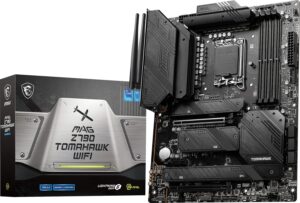
If the MPG Z790 Carbon is too expensive but you still want a reliable Intel 13th/14th Gen board with overclocking support, the MAG Z790 Tomahawk WiFi hits the sweet spot. A solid 16+1+1 VRM handles any consumer Intel CPU, four M.2 slots give you plenty of storage options, and the board supports an upgrade path from 12th to 14th Gen Intel CPUs.
| CPU Support | Intel 14th / 13th / 12th Gen (LGA 1700) |
| Chipset | Intel Z790 |
| Memory | DDR5 up to 7200 MT/s (OC) |
| VRM | 16+1+1 stage |
| Storage | 4x M.2 + SATA |
| Networking | Wi-Fi 6E |
| Form Factor | ATX |
| ✅ Reasons to Buy | ❌ Reasons to Avoid |
| • Strong 16+1+1 VRM | • No Wi-Fi 7 |
| • Four M.2 slots | • Design is conservative / plain |
| • Excellent value for Z790 | • LGA 1700 — limited upgrade path going forward |
| • Works with 12th–14th Gen Intel CPUs |
12. MSI PRO B760-P WiFi DDR4 — Best Budget Intel Board
Platform: Intel LGA 1700 · Chipset: B760 · Form Factor: ATX
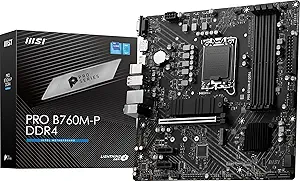
For budget Intel builds, the PRO B760-P WiFi DDR4 stands out because it uses DDR4 memory — making it cost-effective for users who already own DDR4 RAM or want to avoid the DDR5 premium. It supports 12th, 13th, and 14th Gen Intel Core CPUs, comes with built-in Wi-Fi, two PCIe 4.0 M.2 slots, and a decent 12+1+1 VRM.
No overclocking support (B760 chipset limitation), but for a reliable everyday PC, office workstation, or casual gaming build, it delivers everything you need at a very accessible price.
| CPU Support | Intel 14th / 13th / 12th Gen (LGA 1700) |
| Chipset | Intel B760 |
| Memory | DDR4 up to 5333 MT/s |
| VRM | 12+1+1 stage |
| Storage | 2x M.2 PCIe 4.0 + SATA |
| Networking | Wi-Fi (built-in) |
| Form Factor | ATX |
| ✅ Reasons to Buy | ❌ Reasons to Avoid |
| • DDR4 support saves money on RAM | • No CPU overclocking (B760 chipset) |
| • Two PCIe 4.0 M.2 slots | • No DDR5 support |
| • Built-in Wi-Fi | • End of LGA 1700 platform lifecycle |
| • Supports 12th–14th Gen Intel |
MSI Motherboard Buying Guide: What to Look For
Not a tech expert? Here’s what actually matters when choosing a motherboard — explained simply.
1. Match Your CPU to the Right Socket
Every CPU requires a specific motherboard socket. You cannot mix and match. Here’s the current breakdown for MSI motherboards:
- AMD Ryzen 9000 / 8000 / 7000 → Socket AM5 (B850, X670E, B650, A620)
- AMD Ryzen 5000 and older → Socket AM4 (B550, X570)
- Intel Core Ultra 200 (Arrow Lake) → LGA 1851 (Z890, B860)
- Intel 12th / 13th / 14th Gen Core → LGA 1700 (Z790, B760, H770)
2. Chipset Determines What You Can Do
The chipset controls overclocking, PCIe lane availability, and feature limits. In practical terms:
- Z-series (Z790, Z890) and X-series (X670E) → Full overclocking, most features, highest price
- B-series (B850, B650, B760, B860) → Mid-range, still supports memory OC (except B760), great value
- A-series / H-series (A620, H770) → Entry-level, no CPU overclocking, budget builds
3. DDR4 vs DDR5
All current AM5 boards use DDR5 only. Most current Z890 / Z790 boards use DDR5 as well. The MSI PRO B760-P WiFi DDR4 is a notable exception that supports DDR4, which can save money if you already own DDR4 RAM. For new builds in 2025, DDR5 is the better long-term investment.
4. Wi-Fi Generation Matters
- Wi-Fi 7 (802.11be) — Found on B850 and Z890 boards. Fastest wireless available today.
- Wi-Fi 6E (802.11ax) — Found on X670E and older Z790 boards. Still excellent for gaming.
- Wi-Fi 6 or no Wi-Fi — Older budget boards. Consider a Wi-Fi card add-on if needed.
5. M.2 Slots: How Many Do You Need?
M.2 slots are where your fast NVMe SSDs go. For most users, two is plenty. Creative professionals or heavy multitaskers might want three or four. PCIe 5.0 M.2 slots (found on B850, Z890 boards) offer the fastest storage speeds currently available.
6. VRM: Why It Matters for High-End CPUs
VRM (Voltage Regulator Module) stages power delivery to your CPU. A larger number of higher-rated stages = more stable performance under load, especially for high-power CPUs like Ryzen 9 or Core i9. For a Ryzen 5 or Core i5, a modest VRM is fine. For flagship CPUs, look for 14+ stages with 55A or higher ratings.
Conclusion
MSI continues to be one of the strongest motherboard brands across both AMD and Intel platforms. The 2025 lineup, led by the new B850 and Z890 boards, brings Wi-Fi 7, PCIe 5.0 storage, and better power delivery to mainstream price points that were previously only found on enthusiast boards.
For most gamers building a new AMD PC today, the MAG B850 Tomahawk MAX WiFi is the best overall pick. For Intel users on the latest Core Ultra 200 platform, the PRO Z890-P WiFi delivers everything you need with room to grow. And for budget builders, the PRO A620M-E (AMD) and PRO B760-P WiFi DDR4 (Intel) remain strong entry-level options with no unnecessary compromises.
Frequently Asked Questions
Are MSI motherboards reliable?
Yes. MSI motherboards are well-regarded for long-term reliability, especially in the MAG and MPG tiers. They use server-grade PCB materials on most current boards and back them with a 3-year warranty.
Which MSI board is best for gaming in 2025-26?
For AMD: the MAG B850 Tomahawk MAX WiFi offers the best blend of price and performance. For Intel: the PRO Z890-P WiFi is the top pick for Core Ultra 200 builds.
Can I use a Ryzen 9000 CPU on a B650 motherboard?
Not directly out of the box on most B650 boards — B650 was designed for Ryzen 7000. However, MSI has released BIOS updates for some B650 boards to support Ryzen 9000. Always check MSI’s official CPU compatibility list before purchasing.
What is the difference between B850 and X870E?
X870E is the enthusiast chipset requiring PCIe 5.0 for both the GPU slot and at least one M.2. B850 is the mainstream chipset where PCIe 5.0 on the GPU slot is optional (some boards like the Tomahawk MAX still include it). X870E boards tend to cost more and offer more overclocking flexibility and USB4 support.
Do MSI Z890 boards support DDR4?
No. All Intel Z890 motherboards, including MSI’s Z890 lineup, support DDR5 only. If you need DDR4 support, look at the MSI PRO B760-P WiFi DDR4 on the LGA 1700 platform.
Is it worth buying a Z790 board in 2026?
Only if you’re upgrading within the 12th–14th Gen Intel ecosystem. The LGA 1700 platform has reached end-of-life for new Intel CPU releases. If you’re starting fresh, invest in an LGA 1851 (Z890) board for a longer upgrade path.
