

The best PC case for airflow can lower your CPU and GPU temperatures by 5-10°C compared to a choked glass-front box — the difference between thermal throttling and full boost clocks. With RTX 50-series GPUs and high-core-count CPUs dumping more heat than ever, a mesh-front case with unobstructed intake is one of the cheapest performance upgrades you can buy.
This guide compares six airflow-focused cases you can buy in 2026, from the legendary Fractal Torrent to value picks that include all the fans you need. Every case here prioritizes mesh panels and real fan capacity over tempered-glass fashion.
Quick Picks: Best PC Cases for Airflow at a Glance
| PC Case | Best For | Airflow & Fans | Key Strength |
|---|---|---|---|
| Fractal Design Torrent | 🏆 Best Overall | Full mesh; 2×180mm + 3×140mm fans | Exceptional cooling for high-end CPUs & GPUs |
| Lian Li Lancool 216 | 💰 Best Value | Mesh front; 2×160mm + 1×140mm fans | Outstanding airflow and value |
| Phanteks XT Pro Ultra | 💵 Best Budget | Mesh front; 4×140mm D-RGB fans | Excellent cooling with RGB included |
| Corsair 5000D Airflow | 🔧 Best All-Rounder | High-airflow mesh; 2×120mm fans | Excellent build quality and component support |
| NZXT H7 Flow (2024) | 🎨 Best Looks + Airflow | Perforated front; fan setup varies by SKU | Clean design with strong cooling potential |
| Fractal Design Meshify 3 | ⚖️ Best Balanced | High-airflow mesh; 3×140mm fans | Great balance of airflow, compatibility, and design |
1. Fractal Design Torrent — Best Overall
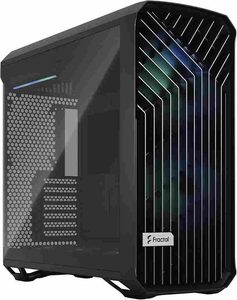
| Spec | Details |
|---|---|
| Form Factor | Mid-tower (E-ATX/ATX/mATX/ITX) |
| Front Panel | Full mesh, no glass blocking intake |
| Fans Included | 2x 180mm front, 3x 140mm bottom [VERIFY] |
| GPU Clearance | [VERIFY] |
| CPU Cooler Height | [VERIFY] |
| Price | [VERIFY] |
The Fractal Design Torrent is the airflow king — a case designed from the ground up around massive 180mm front fans and an open mesh front that barely impedes intake. It consistently posts the lowest GPU and CPU temperatures in its class because it moves an enormous volume of air with large, slow-spinning fans. If raw thermal performance is the priority, nothing here beats it.
Best for: Hot-running builds (RTX 5080/5090, high-core CPUs) where every degree matters, and builders who prioritize thermals over tempered glass.
Pros:
- Best-in-class airflow from huge 180mm intake fans
- Full mesh front with minimal restriction
- Excellent out-of-the-box fan setup — no extra purchases needed
- Fractal build quality and thoughtful layout
Cons:
- Bulky — check desk space and dimensions
- 180mm fans limit replacement options (non-standard size)
- Premium price for a mid-tower
Who should NOT buy this: Compact-desk builders and anyone who wants a glass showcase front — the Torrent is function over form. SFF builders should look elsewhere entirely.
2. Lian Li Lancool 216 — Best Value
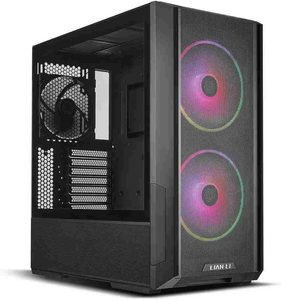
| Spec | Details |
|---|---|
| Form Factor | Mid-tower (E-ATX/ATX/mATX/ITX) |
| Front Panel | Mesh |
| Fans Included | [VERIFY — typically 2x 160mm front + 1x 140mm rear] |
| GPU Clearance | [VERIFY] |
| CPU Cooler Height | [VERIFY] |
| Price | [VERIFY] |
The Lian Li Lancool 216 delivers near-Torrent airflow at a mid-range price, with oversized front fans and a mesh front that made it an instant classic. It’s the case reviewers recommend when someone wants great thermals without the flagship price — easy to build in, with excellent cable management and fan capacity for the money.
Best for: Builders who want top-tier airflow per dollar and a straightforward, no-nonsense build experience.
Pros:
- Excellent airflow close to cases costing much more
- Oversized front fans move serious air quietly
- Great cable management and build quality for the price
- Wide radiator and GPU support
Cons:
- Stock fan configuration worth confirming — varies by SKU
- Plainer looks than RGB-heavy competitors
- Can be out of stock during demand spikes [VERIFY]
Who should NOT buy this: RGB showcase builders — the 216 is understated. If you want maximum thermal headroom regardless of price, the Torrent wins.
3. Phanteks XT Pro Ultra — Best Budget
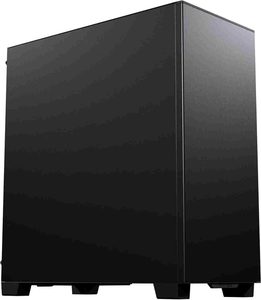
| Spec | Details |
|---|---|
| Form Factor | Mid-tower (ATX/mATX/ITX) |
| Front Panel | Mesh |
| Fans Included | 4x RGB fans |
| GPU Clearance | [VERIFY] |
| CPU Cooler Height | [VERIFY] |
| Price | [VERIFY] |
The Phanteks XT Pro Ultra is the budget airflow champion: a mesh-front mid-tower that ships with four RGB fans, so you don’t spend extra completing the cooling setup. It won’t match the Torrent’s thermals, but for RTX 5070-class builds it’s more than enough — and the included fans alone would cost nearly the price difference versus bare cases.
Best for: Budget builders who want good airflow and RGB out of the box with no extra fan purchases.
Pros:
- Four RGB fans included — exceptional value
- Mesh front for solid airflow
- Clean modern design with tempered glass side
- Easy build experience for first-timers
Cons:
- Airflow a tier below the Torrent and Lancool 216
- Included fans are decent, not premium
- Less radiator flexibility than larger cases [VERIFY]
Who should NOT buy this: High-end builds with RTX 5080+ — spend more on the case when the GPU costs two grand. Silence-focused builders should look at be quiet! instead.
4. Corsair 5000D Airflow — Best Mid-Tower All-Rounder
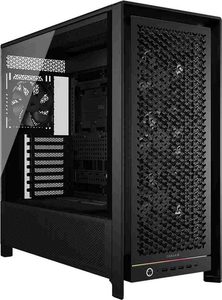
| Spec | Details |
|---|---|
| Form Factor | Mid-tower (E-ATX/ATX/mATX/ITX) |
| Front Panel | High-airflow mesh |
| Fans Included | 2x 120mm |
| GPU Clearance | [VERIFY] |
| CPU Cooler Height | [VERIFY] |
| Price | [VERIFY] |
The Corsair 5000D Airflow is the safe, popular choice — a mesh-front mid-tower with Corsair’s excellent build quality, the RapidRoute cable management system, and room for big GPUs and 360mm radiators. It doesn’t win thermal shootouts against the Torrent, but it’s the easiest recommendation for builders who want proven quality and wide parts compatibility.
Best for: First-time and experienced builders who want a refined, easy-to-build-in airflow case from a major brand.
Pros:
- Excellent build quality and cable management
- Mesh front with good thermal performance
- Fits large GPUs and 360mm radiators
- Huge ecosystem of Corsair accessories
Cons:
- Only two 120mm fans included — plan to add more
- Costs more than the Lancool 216 for similar airflow
- You’ll pay the “Corsair tax” on matching fans
Who should NOT buy this: Maximum-airflow seekers (Torrent) and strict budget builders (XT Pro Ultra includes more fans for less).
5. NZXT H7 Flow — Best Looks + Airflow
| Spec | Details |
|---|---|
| Form Factor | Mid-tower (E-ATX/ATX/mATX/ITX) |
| Front Panel | Perforated |
| Fans Included | [VERIFY] |
| GPU Clearance | [VERIFY] |
| CPU Cooler Height | [VERIFY] |
| Price | [VERIFY] |
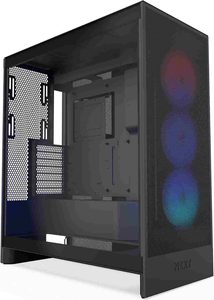
The NZXT H7 Flow proves airflow cases don’t have to look industrial. Its perforated front panel feeds plenty of air while keeping NZXT’s clean, minimalist aesthetic — and the 2024 revision improved GPU clearance and fan support. It’s the pick for builders who want their PC to look as good as it cools.
Best for: Design-conscious builders who refuse to choose between thermals and aesthetics.
Pros:
- Clean minimalist design with real airflow
- Good GPU clearance in the revision
- Straightforward, tidy build experience
- Perforated panel balances looks and intake
Cons:
- Airflow trails the mesh-front leaders
- Stock fan setup worth verifying by SKU
- NZXT premium over similar-performing cases
Who should NOT buy this: Thermal-maximalists — the perforated panel can’t match full mesh. Budget builders get more cooling per dollar from the XT Pro Ultra.
6. Fractal Design Meshify 3 — Also Great
| Spec | Details |
|---|---|
| Form Factor | Mid-tower |
| Motherboard Support | E-ATX / ATX / mATX / Mini-ITX |
| Front Panel | High-airflow mesh |
| Fans Included | 3× 140mm |
| GPU Clearance | Verify based on configuration |
| CPU Cooler Height | Verify |
| Price | Verify |
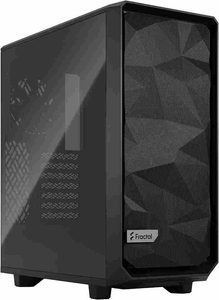
The Fractal Design Meshify 3 is a modern high-airflow case designed around excellent cooling, flexible component compatibility, and Fractal’s familiar build quality. Its mesh-focused design provides strong airflow without sacrificing a clean, refined appearance.
Compared with the Torrent, the Meshify 3 takes a more balanced approach, offering a flexible internal layout and broad hardware compatibility rather than relying on the Torrent’s massive front fans. It’s an excellent choice for high-performance gaming PCs and workstation builds where airflow, expandability, and practicality all matter.
Best for: Builders who want a modern airflow-focused case with strong compatibility, excellent build quality, and plenty of room for high-end hardware.
Pros
- Excellent airflow-focused mesh design
- Modern and highly flexible interior
- Strong support for high-end GPUs and cooling hardware
- Excellent Fractal Design build quality
- Good balance between airflow, compatibility, and aesthetics
- Suitable for powerful gaming and workstation builds
Cons
- Can be more expensive than older airflow-focused cases
- Larger footprint than compact alternatives
- Stock configuration may not be ideal for every build
- Styling may not appeal to everyone
Who should NOT buy this
Buyers looking for the smallest possible case should consider a compact alternative. Likewise, if your priority is purely maximum out-of-the-box cooling performance, it’s worth comparing the Meshify 3 directly against cases such as the Torrent and Lancool 216 before deciding.
Case Buying Guide: How to Choose for Airflow
Mesh front beats glass front, always
For airflow, the front panel is everything. Mesh and perforated fronts let intake fans breathe; solid glass or plastic fronts choke them. Every case in this guide has a breathable front — that’s the baseline requirement.
Count the included fans — and their size
A case is only as good as its airflow setup. Larger fans (140mm, 180mm) move more air quietly than 120mm. Cases that include a full fan complement (Torrent, XT Pro Ultra) save you $40-60 versus buying fans separately.
Check GPU and cooler clearance
RTX 50-series cards are long — verify GPU clearance against your specific card, and CPU cooler height against your air cooler or radiator thickness. When in doubt, the manufacturer’s spec page is the authority.
Positive pressure keeps dust out
More intake than exhaust creates positive pressure, which pushes dust out of seams instead of sucking it in. Pair with the case’s dust filters and clean them every few months.
Don’t forget the PSU and cables
A case with good cable management (behind-motherboard routing, shrouds) isn’t just prettier — tidy cables don’t block airflow. Fully modular PSUs help enormously here.
Common Mistakes to Avoid
- Buying a glass-front case for a hot build. It looks great in photos and throttles in practice.
- Running negative pressure. More exhaust than intake turns every seam into a dust intake.
- Blocking intakes. Pushing a mesh-front case against a wall or stuffing it in a cabinet defeats the purpose.
- Forgetting radiator compatibility. A 360mm AIO needs a case that actually fits 360mm — check before buying both.
- Cheap fans. The case matters, but loud, weak stock fans ruin it. Budget for quality fans if the case ships bare.
Conclusion
Choosing the best PC case for airflow in 2026 comes down to your hardware, budget, and cooling priorities. The Fractal Design Torrent is the top choice for maximum airflow, while the Lian Li Lancool 216 offers exceptional value. Budget builders should consider the Phanteks XT Pro Ultra, and the Corsair 5000D Airflow remains a strong all-rounder. For clean aesthetics with capable cooling, the NZXT H7 Flow and Fractal Design Meshify 3 are excellent alternatives.
Whichever case you choose, prioritize a mesh or perforated front panel, adequate fan support, GPU clearance, and proper airflow direction. A well-ventilated case can help maintain lower CPU and GPU temperatures, reduce fan noise, and support sustained performance during demanding gaming and workloads.
Frequently Asked Questions
Does a high-airflow case really lower temperatures?
Yes — expect 5-10°C lower GPU and CPU temperatures versus a restricted case with the same components. That headroom translates directly into higher sustained boost clocks and quieter fans.
Mesh vs. perforated front — which is better?
Full mesh flows the most air. Perforated metal (like the H7 Flow) is close behind and looks cleaner. Both are vastly better than solid glass or plastic fronts.
How many fans do I actually need?
Three intake and one or two exhaust is the sweet spot for most builds. More fans help up to a point, but placement matters more than count — unobstructed front-to-back airflow beats a dozen poorly placed fans.
Will these cases fit an RTX 5090?
Most will, but verify — 5090 cards are among the longest GPUs ever made. Check your exact card’s length against the case’s GPU clearance spec, and remember front radiators eat into that clearance.
