
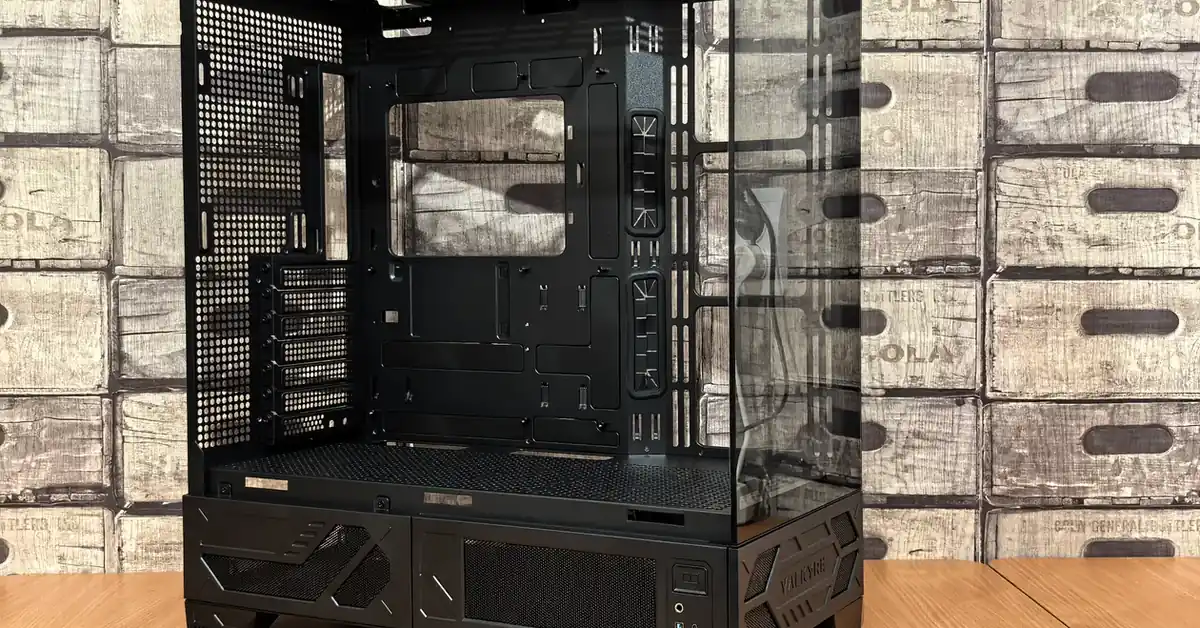
There is a special kind of frustration reserved for builders who unbox a brand-new graphics card, slide it toward the front of the case, and realize the drive cage is sitting exactly where the card needs to be. Or for the builder who mounts a Mini-ITX board into a mid-tower chassis and wonders why the motherboard screws do not line up. These are not rare mistakes. They happen because PC case sizes are described with two different vocabularies at once: motherboard form factors (ATX, Micro-ATX, Mini-ITX) and tower categories (full tower, mid tower, mini tower). When the two do not line up, parts do not fit, airflow suffers, and the build gets harder than it needs to be.
This guide untangles both systems. You will learn the standard motherboard form factor dimensions, what full, mid, and mini towers actually mean in practice, which clearance numbers matter most (GPU clearance, cooler height, and radiator support), and a straightforward method for matching a case to a build plan. Whether you are putting together your first gaming PC or a compact living-room machine, the goal is the same: choose a case size once, and never fight your hardware to fit inside it.
What Is a PC Case Size?
A “PC case size” is really shorthand for two related but different things. The first is the motherboard form factor the case accepts. Form factors are physical standards that define a motherboard’s width, depth, mounting-hole positions, and expansion-slot count. Because these standards are shared across manufacturers, an ATX motherboard from one brand fits any case designed for ATX. The three mainstream form factors are ATX, Micro-ATX, and Mini-ITX.
The second is the tower category — full tower, mid tower, or mini tower — which describes the case itself. Unlike motherboard form factors, tower categories are loose industry conventions, not formal standards. There is no official body that decides where a mid tower ends and a full tower begins. In general, a full tower is the largest consumer chassis with the most drive bays and cooling mounts, a mid tower is the most popular all-around size for gaming and productivity builds, and a mini tower is a compact chassis aimed at small builds. Because these categories are informal, you should always check a case’s listed specifications (GPU max length, cooler height, radiator support) rather than trusting the category name alone.
The relationship between the two systems matters most: a case is almost always described by the largest motherboard form factor it supports. An “ATX mid tower” holds ATX, Micro-ATX, and Mini-ITX boards because the smaller form factors share the same mounting-hole pattern positions. A “Mini-ITX mini tower,” on the other hand, only fits Mini-ITX boards — anything larger physically will not mount.
Key Features That Define a Case Size
- Motherboard support: The form factors a case accepts — typically listed as ATX, Micro-ATX (mATX), and Mini-ITX, or a subset. This is the first filter for any build. A board and case must share at least one compatible form factor, or the mounting holes will not line up.
- GPU max length: The maximum graphics card length the case allows, listed in millimeters by the manufacturer. Long, high-end graphics cards are often the single biggest fitment risk in compact cases, so compare the card’s published length against this number before buying.
- CPU cooler height: The maximum air-cooler height the case can accommodate, measured from the motherboard surface to the side panel. Large dual-tower air coolers can exceed the clearance of slim cases.
- Radiator/fan mounts: Which radiator sizes the case supports (for example 120 mm, 240 mm, 280 mm, or 360 mm) and where they mount — front, top, or rear. Standard AIO radiator sizes are based on 120 mm fans (120/240/360 mm) or 140 mm fans (140/280/420 mm). (Radiator size standards: Checked 2026-10-06)
- Drive bays: Space for 2.5-inch SSDs and 3.5-inch hard drives. Full towers typically offer the most bays, while small form factor builds often rely on M.2 storage and may have only one or two 2.5-inch mounts.
- PSU form factor: Most ATX mid and full towers take standard ATX power supplies, but many Mini-ITX cases require the smaller SFX or SFX-L form factor. Confirm this before buying — an ATX PSU will not fit an SFX-only chassis.
- Expansion slots: The rear slot count should match the motherboard form factor (7 for ATX, 4 for Micro-ATX, 1 for Mini-ITX). These openings determine how many expansion cards the case can physically expose.
- Airflow path: Intake and exhaust fan positions. Larger cases generally offer more fan mounts and longer, straighter airflow paths, while compact cases depend more on component placement and tight, efficient layouts.
How Case Sizes Work
1. Form factor standards define the board. The motherboard industry settled on a small number of shared physical standards decades ago. ATX measures 12 × 9.6 inches (305 × 244 mm) and provides 7 expansion slots. (Checked: 2026-10-06) Micro-ATX measures 9.6 × 9.6 inches (244 × 244 mm) with 4 expansion slots. (Checked: 2026-10-06) Mini-ITX measures 6.7 × 6.7 inches (170 × 170 mm) with 1 expansion slot. (Checked: 2026-10-06) Because these are agreed-upon standards, any brand’s board of a given form factor uses the same footprint.
2. Cases are built around those standards. Case manufacturers design mounting trays, standoffs, and rear I/O cutouts to match one or more form factors. A case rated “ATX” includes standoff positions for the ATX pattern, which also covers the smaller Micro-ATX and Mini-ITX boards — the smaller form factors reuse a subset of the same mounting holes. That is why compatibility flows downward: an ATX case fits smaller boards, but a Mini-ITX case cannot fit an ATX board.
3. Tower categories add the physical chassis. Full, mid, and mini towers describe how much room the chassis gives you around the motherboard: space for long GPUs, tall coolers, multiple radiators, drive bays, and cable routing. A full tower gives the most of everything; a mid tower balances room with desk footprint; a mini tower trades room for compactness.
4. Clearance specs are where fitment is decided. Even within one tower category, cases differ. One mid tower might allow a 420 mm GPU while another tops out at 360 mm. The three clearance numbers to always check on a case’s spec sheet are GPU max length, CPU cooler max height, and supported radiator sizes. If your parts fall inside all three, the build fits; if any one fails, it does not.
5. Small form factor builds add PSU and thermal rules. Mini-ITX cases frequently require SFX or SFX-L power supplies, and cramped layouts make cooling choices more critical — every component competes for the same limited air. Small form factor build planning rewards careful reading of the case manual, especially fan direction and cable routing guidance.
ATX vs Micro-ATX vs Mini-ITX Motherboard Form Factor Differences
| Specification | ATX | Micro-ATX (mATX) | Mini-ITX |
|---|---|---|---|
| Dimensions (in) | 12 × 9.6 | 9.6 × 9.6 | 6.7 × 6.7 |
| Dimensions (mm) | 305 × 244 | 244 × 244 | 170 × 170 |
| Expansion slots | 7 | 4 | 1 |
| Fits in an ATX case? | Yes | Yes | Yes |
| Fits in a Micro-ATX case? | No | Yes | Yes |
| Fits in a Mini-ITX case? | No | No | Yes |
Case Size Use Cases: Which Build Is Each For?
Full tower — the workstation and enthusiast flagship. If you are building a multi-GPU workstation, a custom water-cooling loop, or a system with a large number of drives, a full tower is the natural home. These are the largest consumer cases, with room for the biggest radiators (up to 360 mm and beyond in many designs), multiple tall coolers, and generous cable-routing space. The trade-off is footprint: full towers are heavy and desk-hungry.
Mid tower — the default for most builders. The mid tower is the most popular case size for a reason. It fits a full ATX motherboard and the longest graphics cards most builders will ever buy, supports common AIO sizes like 240 mm and 280 mm, and still sits comfortably on or beside a desk. For gaming PCs, productivity builds, and general-purpose machines, a mid tower is the safe starting point. Our gaming case roundups are dominated by mid towers for exactly this reason.
Mini tower — the compact general-purpose PC. Mini towers typically house Micro-ATX or Mini-ITX boards and suit office PCs, home-theater builds, and modest gaming machines. They are easier to place on a desk or in an entertainment center, but GPU clearance, cooler height, and PSU form factor need closer attention than in a mid tower.
Mini-ITX small form factor — maximum compactness, maximum planning. SFF builds are for builders who want the smallest possible footprint and are willing to plan carefully. Part selection becomes an exercise in measured compatibility: card length, cooler height, SFX PSU, and thermal layout all interact. These builds reward experience but deliver an impressive amount of performance in a chassis that can disappear on a desk.
For broader advice on choosing among actual cases once you have settled on a size, see our custom PC case buying guide.
Full Tower vs Mid Tower vs Mini Tower vs Mini-ITX (SFF) PC Case Comparison
| Feature | Full Tower | Mid Tower | Mini Tower | Mini-ITX Small Form Factor (SFF) |
|---|---|---|---|---|
| Best for | Multi-GPU workstations, custom water-cooling loops, many-drive builds | Gaming PCs, productivity builds, general-purpose machines | Office PCs, home-theater builds, modest gaming machines | Ultra-compact builds, living-room PCs |
| Motherboard support | ATX, Micro-ATX, Mini-ITX | ATX, Micro-ATX, Mini-ITX | Micro-ATX or Mini-ITX | Mini-ITX only |
| GPU clearance | Longest available | Fits the longest cards most builders buy | Needs closer checking | Often the biggest fitment risk |
| CPU cooler height | Tallest coolers, including dual-tower air coolers | Large air coolers usually fit | Check max height carefully | Tight, so check the spec sheet |
| Radiator support | Largest, up to 360 mm and beyond in many designs | Common AIO sizes such as 240 mm and 280 mm, often 360 mm | Often limited to 120 mm or 240 mm | Often limited to 120 mm or 240 mm |
| Drive bays | Most 2.5″ and 3.5″ bays | Moderate | Limited | One or two 2.5″ mounts, often M.2-reliant |
| PSU form factor | Standard ATX | Standard ATX | Varies, so confirm | Often SFX or SFX-L |
| Airflow | Most fan mounts, longest airflow paths | Room for warm air to exit | Needs deliberate fan placement | Depends on component placement and tidy layout |
| Upgrade headroom | Highest | High, with the best balance of current fit and future flexibility | Limited | Lowest |
| Desk footprint | Heavy and desk-hungry, can be too deep for standard desks | Sits comfortably on or beside a desk | Easy to place on a desk or in an entertainment center | Smallest |
| Difficulty | Easy to fit, harder to place | Beginner-friendly | Moderate | Requires careful planning |
Benefits of Choosing the Right Case Size
Component compatibility without guesswork
The right case size removes fitment from the worry list. When the motherboard form factor, GPU length, cooler height, and radiator size are all within the case’s published limits, assembly becomes a straightforward process instead of a series of compromises — no removing drive cages, no side panels that will not close, no cooler that blocks a RAM slot.
Better cooling and airflow
Airflow depends on fan placement, but case volume sets the terms. A mid tower gives warm air room to exit without recirculating around hot components, and supports larger radiators for liquid cooling. Compact cases can cool well too, but they demand intentional fan placement and tidy cabling — choosing a size that matches your cooling plan means your components run within their designed temperature ranges with less fan noise.
Cleaner cable management
Cases designed around a given form factor include routed cutouts, tie points, and PSU shrouds sized for the board they expect. A properly sized case hides cables behind the motherboard tray instead of stuffing them into airflow paths. Better cable routing improves airflow, makes dust removal easier, and simplifies future upgrades.
Room to grow
A case is the longest-lived part of most builds — it often survives two or three generations of motherboard, CPU, and GPU upgrades. Choosing a size with some headroom (an extra radiator mount, space for a longer card, spare drive bays) protects that investment. Full and mid towers excel here; compact cases trade upgradability for footprint, which is worth accepting consciously rather than discovering later.
A quieter system
Noise often comes from small fans working hard in tight spaces. Larger cases accept bigger, slower-spinning fans that move the same air with less noise, and they keep turbulence away from grilles and filters. If a quiet build matters to you, case size is one of the most effective levers — and one of the cheapest, since it is decided before a single part is ordered.
Choosing the Right PC Case Size
- Start with the motherboard form factor. Your board choice anchors everything. ATX boards need at least an ATX-compatible mid or full tower; Micro-ATX boards give you more case options; Mini-ITX boards unlock the smallest chassis.
- Check GPU max length against your card. Measure twice, buy once. The manufacturer’s published GPU clearance in millimeters must exceed your graphics card’s published length. This is the most common fitment failure in compact builds.
- Match the cooler to the clearance. Confirm the case’s CPU cooler max height against your air cooler’s spec, or confirm radiator support (120, 240, 280, 360 mm, etc.) against your AIO. Remember that radiator support varies by mount location — a case may fit a 280 mm radiator in the front but not the top.
- Verify the PSU form factor. Standard ATX PSUs fit most mid and full towers. Many Mini-ITX and slim cases require SFX or SFX-L. The PSU form factor is listed on every case spec sheet — check it the same day you pick the case.
- Plan your storage. Count your 2.5-inch and 3.5-inch drives and confirm the case has bays for them. If you are building all-M.2, bays matter less, and compact cases become much more practical.
- Think about desk space and portability. A full tower that has nowhere to sit is a bad purchase no matter how roomy it is. Measure the space where the case will live, including depth — full towers can be too deep for standard desks.
- Leave upgrade headroom. If you plan to add a longer GPU, a second radiator, or more drives later, a mid tower usually offers the best balance of current fit and future flexibility.
Our Best Gaming PC Cases of 2026 roundup organizes current options by size and use case if you want to compare real models after narrowing down a category.
Case Maintenance Checklist
- Clean dust filters monthly. Most modern cases include removable front, top, and PSU dust filters. Rinse or wipe them regularly — clogged filters choke airflow and raise component temperatures.
- Verify intake and exhaust directions. After any fan or cooler change, confirm fans blow the intended way (usually front/side intake, top/rear exhaust). Reversed fans create recirculation loops that trap hot air.
- Re-route cables after upgrades. New GPUs, drives, or coolers often disturb cable routing. Tidy cables back behind the motherboard tray so they do not block airflow paths.
- Check that clearance specs still hold. Before adding a longer GPU or taller cooler, re-check the case’s published GPU max length and cooler height limits — upgrades are the most common cause of fitment surprises.
- Inspect radiator mounting points. AIO radiators and their mounting screws should be firm, with no sag or vibration. Re-tighten seasonally, especially in cases mounted under a desk.
- Keep the PSU intake clear. If the PSU draws from a bottom vent, keep the area under the case unobstructed. Carpeted floors are a common cause of PSU overheating in otherwise well-built systems.
- Reassess thermal paste and fans yearly. Cooling performance degrades gradually. An annual check of fan condition and (for experienced builders) thermal paste keeps a well-sized case performing as designed.
Conclusion
PC case sizes come down to two questions: which motherboard form factor are you building on, and how much room do you want around it? Answer those, verify the three clearance numbers — GPU length, cooler height, and radiator support — and the right category usually picks itself. Mid towers remain the best default for most builders, full towers earn their footprint in enthusiast and workstation builds, and Mini-ITX cases deliver remarkable compactness for those willing to plan carefully.
Ready to pick a specific case? Start with our Expert Advice: Choosing the Best PC Case for Custom Build guide, which walks through real case options and the details that matter once your size is decided.
Frequently Asked Questions
1. Can a Micro-ATX motherboard fit in an ATX case?
Yes. Micro-ATX boards use a subset of the ATX mounting-hole pattern, so they mount directly in any case that supports ATX. The same downward compatibility applies to Mini-ITX, which also fits ATX cases. Compatibility only fails going upward — an ATX board will not fit a Micro-ATX or Mini-ITX case.
2. What is the difference between mid tower and full tower?
The distinction is one of size and capacity, not a formal standard. Full towers are the largest consumer cases, with more drive bays, more fan and radiator mounts, and room for the longest GPUs and tallest coolers. Mid towers are smaller and the most popular choice, still fitting ATX boards and most graphics cards while taking up less desk space.
3. Do I need a full tower for a gaming PC?
Almost certainly not. A mid tower fits a full ATX motherboard, the longest mainstream graphics cards, and common AIO liquid coolers (240 mm, 280 mm, and often 360 mm). Full towers are worthwhile for multi-GPU workstations, custom water-cooling loops, or builds with many drives — not for a typical single-GPU gaming PC.
4. What does GPU clearance mean?
GPU clearance (or GPU max length) is the longest graphics card a case can hold, measured in millimeters and published on the case’s specification sheet. To avoid fitment problems, your graphics card’s published length must be shorter than this number. Always compare the two numbers before buying, especially in mini towers and small form factor builds.
5. Can I fit an ATX power supply in a Mini-ITX case?
Usually not. Many Mini-ITX cases are designed for the smaller SFX or SFX-L power supply form factor, and a standard ATX PSU physically will not fit. Always check the case’s listed PSU compatibility before purchasing — this is one of the most common mistakes in first-time small form factor builds.
6. Is Mini-ITX worse for cooling than ATX?
Not automatically, but it is less forgiving. Mini-ITX cases have less air volume and fewer fan mounts, so cooling depends more on component selection, fan direction, and tidy cable management. A well-planned Mini-ITX build can run cool and quiet, while a careless one can trap heat. Larger cases simply give you more margin for error.
7. What radiator sizes do PC cases support?
It depends on the case. Common AIO radiator sizes are based on 120 mm fans (120, 240, and 360 mm) or 140 mm fans (140, 280, and 420 mm). (Checked: 2026-10-06) Case spec sheets list which sizes fit and at which mount positions (front, top, or rear). Larger towers typically support 280 mm and 360 mm radiators, while compact cases may only fit 120 mm or 240 mm.
